
School Sphere · Mobile . IOS Version
School Sphere is a mobile platform that streamline communication and administrative workflows across K–12 schools.
The platform improves operational efficiency by unifying communication and administrative workflows for teachers and administrators.
SCOPE
0 —> 1 Product
DURATION
90 days
ROLE
UX Research, UX/UI Design
One dashboard for attendance, cases, and teacher support, replacing five disconnected tools
Problem:
Teachers face significant administrative overhead from managing communication, reporting, scheduling, and student records across multiple disconnected systems, reducing time available for teaching and student support.
Administrative tasks are fragmented across multiple platforms, creating inefficiencies that limit educators' ability to focus on student engagement and career development.
Solution:
Created a unified platform for teachers and administrators to manage communication, reporting, scheduling, and student records in one place, reducing administrative overhead and improving operational efficiency.


Discovery:
Research focused on understanding administrative workflows within K–12 schools and identifying inefficiencies in existing communication systems.
Key Finding:
How do educators manage communication and administrative tasks today?
Where do existing systems create inefficiencies?
Which workflows consume the most time?
What features are essential in a centralized school management platform?
User Interview:
Conducted 10+ one-on-one interviews with teachers and administrators to understand their daily workflows, communication challenges, and administrative responsibilities.
Julia | 43 | Administrator
“Administrative tasks are extremely frustrating because I have to use multiple different forms to submit work, which is really no point of doing redundant wok.”
Micheal | 32 | Teacher
“Reaches out to parents are absences or tardies every morning.”
Kim | 28 | Teacher
“People will literally give us incorrect phone numbers and then make it our problem”
Key Takeaways:
Communication is fragmented across multiple platforms
Administrative tasks consume significant educator time.
Student information and operational tools are not centralized.
Frequent context switching reduces workflow efficiency.
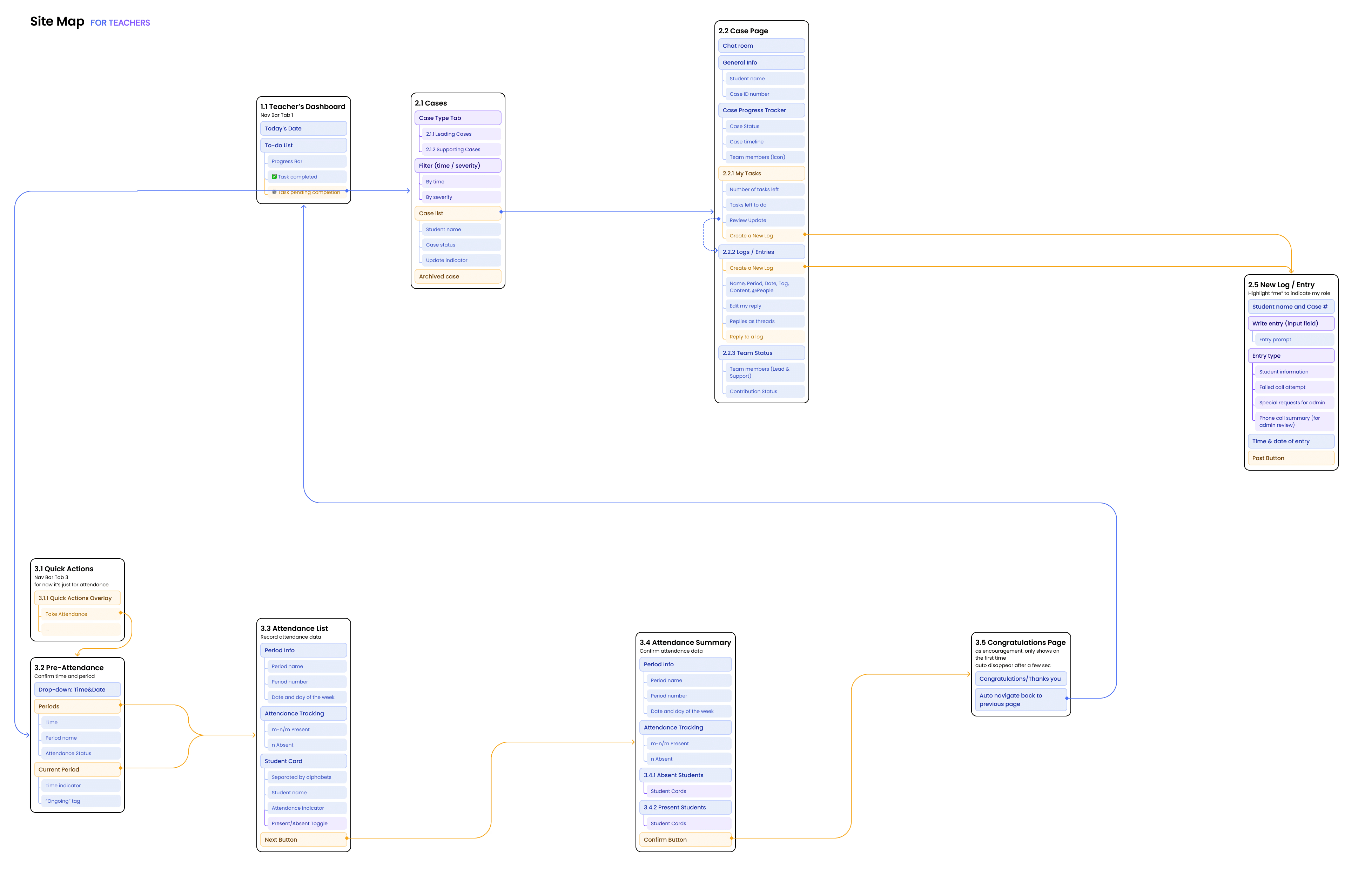
User Site Map
Prototype:
From a passive communication log to an actionable workflow that guides teachers to the next step.
Competitive Analysis:
Assessed industry-leading solutions to understand current market offerings, workflow limitations, andopportunities for operational improvement.
Define:
Case status: making "action required" impossible to miss
First pass tracked cases with plain checkmarks: no signal for what still needed a teacher's attention.
Timeline: separating what's live from what's history
A real information-architecture decision, not a visual pass. Details and Timeline became two distinct tabs so current status never gets buried under old entries.
The automated follow-up toggle: the one feature that directly answers the HMW.
Automating reminders reduces the number of manual follow-up attempts a teacher makes per unresponsive parent, giving back the time the 35% stat surfaced in research.
Strategy: Two principles guided every design decision.
01: Surface status, not just history
A log of what happened is less useful than a clear read on what needs to happen next.
02: Automate the nudge, not the relationship
The system should chase silence so the teacher doesn't have to the human conversation stays human.
Product Opportunity:
How might we turn a teacher's one-off outreach into an automated, visible follow-up system without adding to their workload?


Persona:


Research-driven personas helped guide design decisions and ensure the product addressed users' needs, pain points, and goals.
User Flow

Ideate:
Validation:
Usability testing, start to finish.
Research questions
Can teachers tell, at a glance, which cases need action?
Does the automated follow-up toggle read as trustworthy, not as one more setting to manage?
Does separating Details from Timeline actually reduce time-to-find for a past entry?
Background
Pre-test
Task / think-aloud
Post-test
What changed as a result:
Testing surfaced that "Resolved" needed to exist as its own state, not just an absence of red, direct feedback that shaped the color-coded status system shown above. Participant count and task-level metrics: add here once finalized.
Reflection:
What I learned:
Converging on one persona early made every later decision faster to evaluate, instead of designing for four teachers at once, we could ask "does this serve Ms. Lee?"
What I'd do differently:
Track task-level metrics (time-on-task, success rate) from round one of testing, so the before/after story has numbers alongside the qualitative signal.
Future Opportunities:
Privacy controls around parent contact data
Integrations with existing gradebooks and attendance systems
Import/export for districts switching from another platform
Simplified onboarding for less tech-savvy teachers
Product cohesion with the rest of SchoolSphere: grading, attendance
Back to Portfolio Gallery